
Post Summary: A Live Website Is Not the Same as a Visible Website
Nothing between launching a site and showing up in search happens on its own. Each stage is a gate, and a site that isn’t ranking is usually sitting behind one of them.
A pest control company in Baltimore had a live site, correct contact details, services listed, and no rankings at all. Search Console gave the answer immediately: the sitemap had never been submitted. Google didn’t know the pages existed because nobody had told it to look.
Settings are the other common block. An SEO plugin can carry a site-wide toggle that tells search engines not to index, useful while a site is being built and easy to forget at launch. Robots.txt rules and nofollow directives can close off sections the same way. No amount of content or links matters while a checkbox is telling Google to stay away.
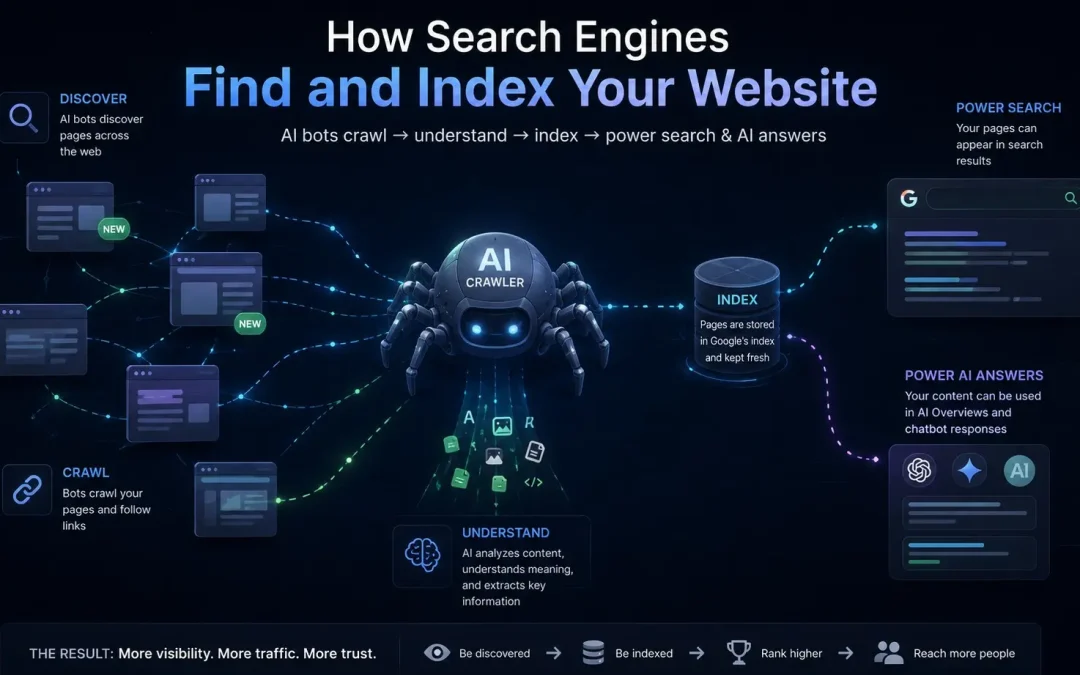
Discovered, crawled, and indexed are three separate stages. Discovery means Google knows the URL exists. Crawling means it visited and read the page. Indexing means it decided the page is worth storing and serving. Only the last one puts a page in results, so a page that answers a question perfectly still won’t appear if it stopped at crawling.
After a few months live with nothing showing, the cause is usually overlap rather than discovery. Residential painting, interior painting, and bedroom painting look like three services from the business side and like three answers to one question from Google’s. It indexes one.
When a rebuild keeps the same URLs, the new site inherits the history rather than starting over. Changing them means setting up 301 redirects for every page, so the URLs are worth leaving alone unless there’s a real reason to restructure.
Live for Months, Invisible the Whole Time
A pest control company out of Baltimore had a website. It had been up for a while. The design was fine, the contact info was right, the services were listed. But nothing was ranking. Not ranking poorly, not ranking at all. When we pulled up Google Search Console, the answer was immediate: the sitemap had never been submitted. Google didn’t know the site existed because nobody had told it to look.
Simple as that.
That’s a more common situation than most business owners realize. The assumption is that once a site goes live, search engines discover it on their own, like flipping a sign from “Closed” to “Open” and expecting foot traffic. But understanding how search engines find websites means accepting that none of it is automatic. Every step between launch and visibility has a mechanism, and if one of those mechanisms hasn’t fired, the site sits in the dark.
What Happens Between Going Live and Getting Found
When we take a website live and Google already knows the domain exists, meaning the domain was previously active, there’s a process we follow that makes this clean. The first thing we look at is the URLs. Every page on a website has a full address, and after the domain there’s a forward slash followed by whatever that page is about, /painting or /plumbing or /website-design. Those extensions after the dot com are what Google already knows and has associated with your domain’s history.
If all those extensions are good and they accurately represent what the page is about, we don’t change them. We’re very careful about that, because there’s no reason to change them.
If we do change them, we have to do what’s called a 301 redirect, which basically tells Google: hey, this page now lives over here. And unless there’s a compelling reason to restructure, rebranding, consolidating thin pages, fixing a broken hierarchy, it’s kind of dumb to change things arbitrarily without figuring things out first. You introduce risk for no gain.
When the URLs stay the same and the new site goes live, it just instantly goes there. Google visits, sees the same addresses serving better content, and treats it as an upgrade in Google’s eyes. The domain keeps its history, the pages keep their equity, and the new design starts working immediately instead of crawling back from a reset.
The other thing we check is the Google Business Profile. We open it in incognito, click the website button, and make sure it links to the new site. If everything’s set up right, that’s an instant change. Small detail, but it matters, that button drives traffic from maps, and if it’s pointing to the old site or a dead page, you’re leaking visitors before they even get to you.
The Settings That Make You Invisible
The most common things that block search engines from finding a small business website aren’t exotic technical failures. They’re settings. Checkboxes someone clicked, or forgot to unclick, that tell Google to stay away.
There are terrible settings where it says “do not rank this page on search engines.” We use Yoast, which a lot of other SEO practitioners use, and there is a place in Yoast where you can tell Google not to index your site.
Why that setting even exists is a fair question. Maybe it’s useful while you’re building, you don’t want a half-finished site showing up in results. But it seems like a very bad idea if somehow you forget to turn it off. And people do forget. The site launches, everything looks great from the front end, and nobody realizes the back end is still telling Google to ignore it.
There’s also nofollow directives you can put on links and pages. There are robots.txt rules that can block entire sections of a site from being crawled. There are a lot of ways to screw up.
Those are kind of bummer ways to lose visibility, because it’s literally a checkbox. You’re just checking a box and suddenly it’s impossible for anybody to find you. No amount of good content or strong backlinks matters if the site is telling Google not to look.
They’re rare. But they have happened.
A Site Google Never Knew About
The Baltimore pest control company wasn’t a complicated diagnosis. They’d never submitted their sitemap. That’s it. No exotic crawl error, no penalty, no manual action. The sitemap, the file that catalogs every page and every post and hands it to Google as a map of the site, had never been sent.
Things weren’t happening super fast for them before we got involved. The content was generic, very simple. Nothing on the site was giving Google a strong reason to prioritize it even if the sitemap had been submitted. But without the sitemap, it wasn’t a question of priority. Google didn’t know the pages existed.
When we took it over, we did all of our processes. We’ve got a long process stack that we follow with every build, the full scope of what our SEO work involves follows a sequence, and sitemap submission to Google Search Console is one of the earliest steps. Then we check back to make sure pages are getting indexed.
Crazy concept.
But that’s what separates a site that ranks from a site that exists. Someone has to verify that Google received the map, read the map, and started visiting the pages on the map. If nobody checks, nobody knows it’s broken, and the business owner is left wondering why a perfectly good website isn’t producing results.
Only the Last Stage Puts You in Results
Most business owners think “live” means “visible.” It doesn’t. Understanding how search engines find websites requires knowing that there’s a sequence, and each stage is a gate that can close without warning.
Google can discover your site and not index it. It can crawl your site and not index it. And then, if everything checks out, it can index it. Those are three different things, and only the last one puts you in search results.
Here’s the difference. When Google indexes a page and someone types a search, Google checks its index for pages that match. The technical word for what someone types into the search box is a query. Q-U-E-R-Y. It’s just a question. You’re putting a question into the search box, and Google is looking through its index for the best answers.
If your page is indexed and it matches up with that query, it can be served to the user. That’s the list everyone’s trying to get on. That’s what “ranking on Google” means.
But if your page has only been discovered or crawled, both of those mean “not indexed”, then even if your page has that exact information, it will not be served as a result. Your page could answer the question perfectly, and Google still won’t show it, because it hasn’t cleared the indexing gate.
Now, that doesn’t mean Google is blocking your website or punishing you. It just means the page hasn’t been processed into the index yet. Discovery means Google knows the URL exists. Crawling means Google has visited the page and read it. Indexing means Google has decided the page is worth storing and serving. Each step narrows the field.
The answers, that whole list, from position one down to wherever it ends, are what gets served. The only way they’re served is if your page is indexed. Everything before that is just Google taking notes.
How Search Engines Find Websites That Have Been Live for Months
If a business owner launched a website three months ago and Google still hasn’t picked it up, the answer is almost always the same: duplicate content.
Not a crawl delay. Not a slow queue. After three months it’s almost always a content problem rather than a discovery problem.
What it looks like: you have pages with very similar content. They may seem different to you, different headings, different images, slightly different wording. But the intent is very similar. One page talks about residential painting, another talks about interior painting, another talks about bedroom painting. To the business owner, those are three different services. To Google, those are three pages trying to answer the same question.
Google’s only going to index one of them.
You have to analyze both pages, or all three, or all five, and figure out where the overlap lives. How can you eliminate it? Should some of these just be on the same page? That’s the biggest diagnostic question, because you see a bunch of pages in your dashboard, but maybe only half of them are indexed. It’s because there’s massive overlap. Google’s not going to rank both of them because it just doesn’t make sense to.
If you want to understand more about why Google makes those choices, how Google decides which sites to rank breaks down the signals behind it.
Three months of invisibility feels alarming, but it’s a common problem and a fixable one. Building pages that are truly unique from each other, that each earn their place in Google’s index on their own terms, is harder than most people think. The fix starts with finding where the overlap lives.
Frequently Asked Questions
How long after launching should my site show up in Google?
If the sitemap is submitted through Google Search Console and no indexing blocks are in place, most pages begin appearing within a week. Some index faster, a day or two, if the domain already had history. Brand-new domains with no backlinks and no authority take longer, sometimes a few weeks for even the first page. If nothing has appeared after a month, something is blocking the process and needs to be diagnosed.
Does Google automatically find my site if I don’t submit a sitemap?
It can, eventually. Google discovers pages through links. If another indexed site links to yours, Google will follow that link and find your page. But waiting for that to happen is slow and unreliable. Submitting a sitemap is like handing Google a map of your entire site and saying “here, start here.” Without it, you’re hoping Google stumbles across you on its own, and that’s not a strategy.
Can a page be indexed and still not rank?
Yes. Indexing means Google has stored the page and will consider it for results. Ranking means the page is competitive enough to appear for specific queries. A page can be indexed and still sit on page five or ten, or deeper, because the content is thin, the competition is strong, or the site has no authority behind it. Indexing is the entry ticket. Ranking is what you earn after you’re in the room.
What’s a 301 redirect and when does it matter?
A 301 redirect tells Google that a page has permanently moved to a new address. It’s necessary when you change a page’s URL, if /painting-services/ becomes /residential-painting/, the redirect makes sure anyone visiting the old address lands on the new one. It also transfers most of the SEO value the old page had built. Without the redirect, the old URL returns an error and all that accumulated equity disappears.
Should I worry about noindex tags if I didn’t set them myself?
Yes. Themes, plugins, and SEO tools can apply noindex tags without you realizing it. Some WordPress themes ship with default settings that discourage search engine visibility. Yoast has a site-wide toggle and per-page toggles that can each independently block indexing. If your site isn’t showing up and you can’t figure out why, check those settings first, it might be a single checkbox that’s keeping Google away.