
Post Summary: A Website Explanation Is Measured by Confidence, Not Comprehension
A website explanation has done its job when the client walks away confident the problem is handled, whether or not they followed the technical details. Some clients can understand technical problems and some want to, the goal of the explanation just isn’t to educate.
Small fixes get made without announcement: a plugin conflict, an image that stopped loading on one specific browser, a validation error in a field most people don’t fill out. When something touches the client’s content, the conversation is what happened, what was done, and you’re good, with no suggestion they should have caught it first.
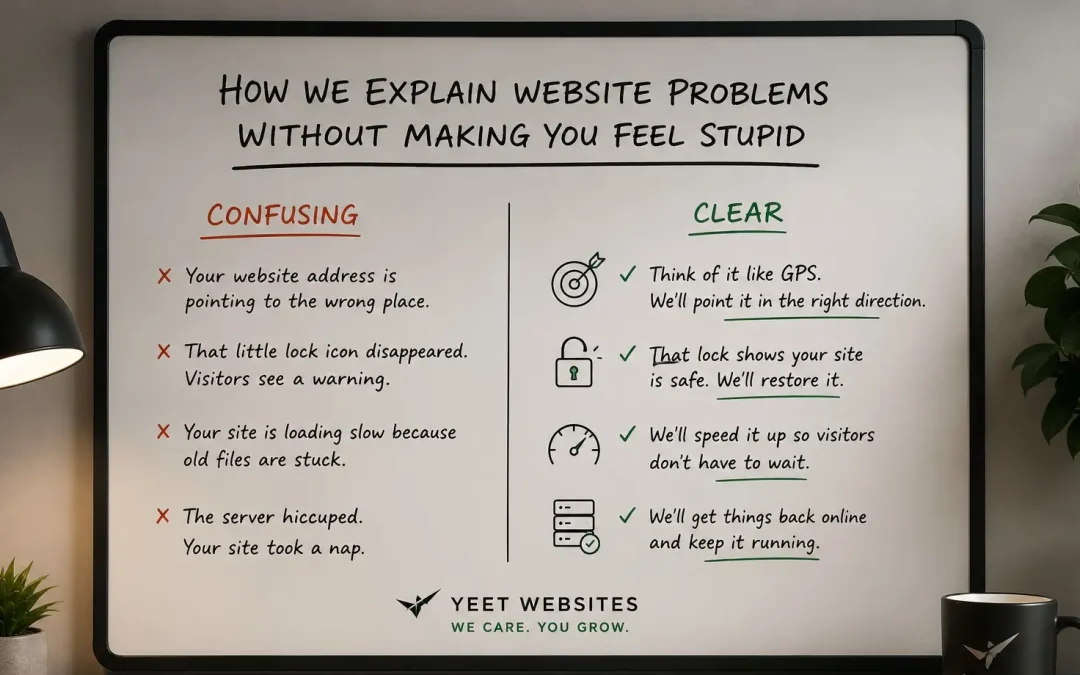
The translation is concrete. Code becomes a language the internet knows how to read that turns into what you see on the page. An SSL certificate becomes the padlock next to your web address that tells visitors a form submission isn’t being intercepted.
Sometimes the simplest version still doesn’t land, and the client says they have no idea what you’re talking about. That isn’t a failure. What matters is whether they feel okay about not fully understanding it and trust that someone does.
Jargon usually comes from habit rather than intent, and newer professionals lean on it hardest because they haven’t built the translation yet. The ability to explain something simply is a sign of deep understanding, and the diagnostic is whether you can explain your work to a third grader.
A client who leaves feeling like a liability stops asking questions, so problems go unreported longer and miscommunications compound.
A Landscaping Business Owner Isn’t a Web Developer
The mechanic doesn’t ask why you didn’t fix your own alternator.
That question would be bizarre. You brought the car in because that’s not your job, it’s theirs. And yet somehow, in the web design world, there’s a version of that dynamic that plays out all the time. A client asks why something isn’t working. The web company explains it in technical terms that go completely over the head of someone who runs a landscaping business or a dental practice. The client nods. Leaves more confused than when they arrived. And somewhere in that exchange, they’ve absorbed the idea that they should have known, that this is something any reasonable person would understand.
They shouldn’t have known. That’s not what they hired a web company to do.
Explaining website problems in plain English sounds simple. It’s not. It requires knowing enough about technology to simplify it accurately, and knowing enough about the person in front of you to calibrate how far to simplify. Most web companies are good at one of those things. The ones that are good at both are rare, and worth finding.
The Goal Is for the Client to Feel Nothing But Relief
Here’s what a good technical explanation produces: not understanding, necessarily, relief.
“Oh. Thank you for handling that. I didn’t even know it was an issue.”
That’s the reaction we’re after. Not because clients can’t understand technical problems, some can, and some want to. But the goal of the explanation isn’t to educate. It’s to communicate that the problem is handled, that they’re in good hands, and that they don’t need to carry it. The website is someone else’s department. That’s what they’re paying for.
We fix a lot of things before clients ever notice them. Plugin conflict. An image that stopped loading on one specific browser. A form that had a validation error in a field most people don’t fill out. If we fix it and it doesn’t affect content or anything the client would recognize as changed, we don’t always announce it. Because the point of the website isn’t to give you a maintenance report every time something gets tuned. It’s to keep running. Like a car, when you turn the key, you want it to start. You don’t want a car that narrates every adjustment it makes to keep itself going. You just want it to go.
When we do tell a client about something, because it involves their content, their message, something they’d want to know about, the conversation is simple. Here’s what happened. Here’s what we did. You’re good. No blame, no implication that they should have caught it first, no jargon that would require a second explanation. The framing is always: this is our job, and we did it.
What Explaining Website Problems in Plain English Looks Like in Practice
A client asks what “the code” is. They bought a website, they can see it on their screen, and they want to understand what the thing underneath is. That’s a fair question.
We don’t say HTML. We don’t say CSS. We don’t say WordPress or PHP or anything that has a name in the industry. We say: it’s written in a language that the internet knows how to read. That language turns into what you see on the page, the colors, the layout, the words in their right places. You don’t need to know the language any more than you need to know how your TV signal works to watch a show. It’s there. It runs. We handle it.
Does that explanation stick? Here’s the honest answer: often, no. We’ll finish the simplest version of an explanation we can give, code is a language the internet reads, it turns into what you see on the screen, and the client will pause and say, “I still have no idea what you’re talking about.” And that’s fine. That’s not a failure. That’s just where some topics live.
What matters isn’t whether they understood the explanation. It’s whether they feel okay about not fully understanding it, whether they trust that someone does, and that someone is watching their website. They received something. They benefit from it. The comprehension gap doesn’t change either of those facts. If someone buys a piece of custom furniture, they don’t need to understand the joinery to appreciate that it’s solid and it’ll hold. The craftsperson’s job is to make something that works, and then make the buyer feel confident it will keep working. Same deal here.
The failure mode, the one that makes clients feel stupid, is when the explanation goes the other direction. More words, more technical. Not because the web professional is trying to confuse anyone, but because they don’t yet know how to distill it. And that’s a real thing worth saying clearly:
The ability to explain something simply is a sign of deep understanding, not shallow knowledge. Most jargon-heavy explanations come from people who haven’t been doing this long enough to have internalized the translation yet.
New professionals are often the most jargon-heavy, not because they’re trying to intimidate anyone, but because they’re still excited about what they’re learning and they haven’t yet built the habit of stepping outside it. They can be great at the technical work. The communication catches up later, usually. But “later” isn’t helpful to the client sitting across from them right now.
The Framework, and Why It’s Not Intuitive
There’s a method to it. It’s not something that comes naturally to most people, and it takes real practice to build.
Before you explain anything, you take a beat. Two or three of them. You put yourself in that specific person’s mindset, not a generic client, not a hypothetical non-technical person, but this person, with their particular business, their particular level of familiarity with tech, the way they’ve been talking in this conversation. And then you speak to that person. Not to a room. Not to a concept. To the actual human who’s waiting for an answer they can use.
That’s only possible if you’ve had enough of a relationship with them to know who you’re talking to. It’s one of the reasons asking the right questions before you hire a web company matters, not just about pricing and timelines, but about how they communicate. How does this person explain things? Do they slow down when you look confused? Do they check in? Do they make you feel like a burden for asking, or like asking is exactly what you should be doing?
The framework in plain terms: understand the person first, explain to that person second. Not to the problem. Not to the technology. To them. Everything else follows from that.
Why Some Web Companies Get This Wrong, and What It Costs You
Most web companies that make clients feel stupid aren’t doing it on purpose. The jargon isn’t a power move, it’s a habit. When you spend years working alongside other web professionals, the shorthand stops feeling like shorthand. Acronyms feel like plain language. Terms that would baffle anyone outside the industry start to read as common sense.
The best diagnostic is this: can you explain what you do to a third grader? Not in a condescending way, in an accurate way that strips out everything that requires context you shouldn’t assume. If you can’t do that, you don’t understand your own work well enough to translate it yet. That’s a solvable problem. But it’s the web company’s problem to solve, not the client’s problem to navigate.
What it costs the client is trust. When you leave a conversation feeling like you missed something obvious, like everyone else in the room understood and you didn’t, you don’t feel good about the relationship. You feel like a liability in it. And clients who feel like liabilities stop asking questions, which means problems go unreported longer, miscommunications compound, and the relationship quietly deteriorates in ways that never get surfaced and never get fixed. The same dynamic that makes proposals impossible to read carries into every conversation afterward if the company doesn’t catch it.
What We Do Differently, and What It Looks Like in Practice
We’ve had clients ask us to explain what an SSL certificate is. Technically, it’s a cryptographic protocol that authenticates a server’s identity and encrypts the data passing between a browser and that server. That explanation is accurate and useless to almost everyone who asks.
What we say: it’s what puts the padlock next to your web address. It tells people visiting your site that the connection is secure, that if they fill out a form or put in an email address, nobody’s intercepting it. Without it, browsers throw a warning page. With it, your site looks trustworthy. We include it. It’s handled. You’ll never have to think about it.
That’s the whole conversation. Not because we’re oversimplifying, because the part that matters to the client is covered. If they want more detail, we go further. Most don’t. Most just want to know they’re okay.
The goal every time is that the client ends the conversation feeling more confident, not less. Like they’ve got a capable person watching their website. Like the technical world is less mysterious because someone they trust is navigating it on their behalf. Not informed about every protocol and framework, just confident. That confidence is something you can screen for before you hire, if you ask the right questions.
FAQ: Explaining Website Problems in Plain English
Should I expect my web company to explain things I don’t understand?
Yes, that’s part of what you’re paying for. Technical work happens on your behalf, in a domain you didn’t sign up to become an expert in. A good web company communicates clearly enough that you understand what’s happening with your own asset, without requiring you to learn the industry to follow along. If you consistently leave conversations more confused than you entered them, that’s a red flag about the relationship, not a gap in your intelligence.
What’s the difference between a web company that explains things well and one that doesn’t?
The one that explains things well has thought about who they’re talking to before they open their mouth. They adjust. They check in. They don’t assume comprehension, they look for it. The one that doesn’t explains to the problem instead of to the person, and leaves you to piece together what it means for your business. Both might be technically competent. Only one will leave you feeling like a partner in the process.
Do I need to understand how my website works?
No. You need to understand what it does for your business, that’s worth knowing. The underlying technology is our responsibility. You wouldn’t expect to understand how your plumbing works at the level a plumber does; you just need to know the water runs when you want it to and stops when you don’t. Same principle here.
What if I ask a question and still don’t understand the answer?
Ask again. A good web company won’t make you feel bad for needing a second pass at something. If the explanation didn’t land, that’s on the explainer, not the person asking. We’d rather take three tries to make something clear than have you leave with a half-understanding that creates problems later.
How do you handle explaining something when there’s no simple version?
We cover what matters to the client, the outcome, and offer to go deeper if they want it. SSL certificates have a technically complex explanation and a practically simple one. We lead with the practical version. If someone wants the full picture, we go there. Most people just want to know whether their site is okay, not a certification course in transport layer security.
How is Yeet’s communication style different from a larger web company?
The same person who builds your site handles your support. That means when something comes up and we need to explain it, we already know your business, your level of comfort with technical topics, and how you like to communicate. We’re not starting from scratch every time. That context doesn’t exist at a larger company where your account passes through multiple hands, every conversation is a cold start, which makes plain-English communication much harder to deliver consistently.