
Post Summary: The Form Works and the Emails Never Arrive
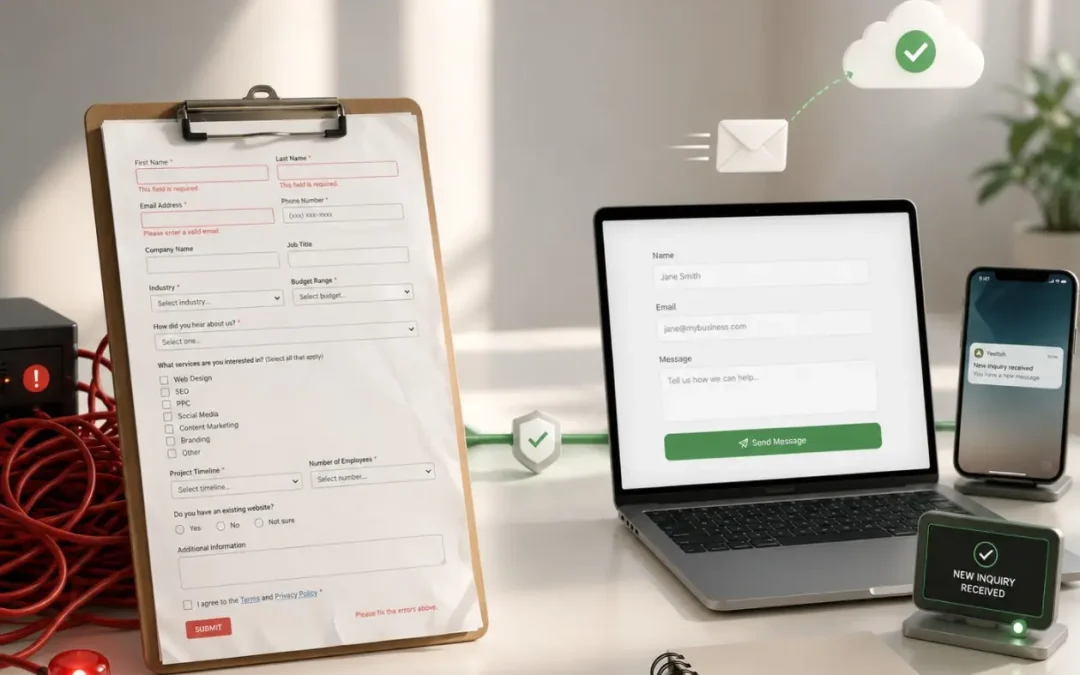
There are two ways to lose someone at the form, and they look nothing alike. The first is friction: each field past the basics gives a visitor another reason to stop. The second is invisible. Submissions addressed to a free email account can be filtered or refused outright by the receiving server, leaving no trace anywhere, spam folder included. Friction is fixed by cutting the form to three fields and swapping open text boxes for checkboxes. The second one is fixed by sending to an address on your own domain. And for a business with steady demand that would rather talk to everyone, taking the form off the page altogether can beat keeping it.
One client’s form pointed at a Comcast address. A test copy sent to a domain email landed straight away. The identical submission to the client’s own address never showed up at all, spam folder included, and had been failing that way unnoticed.
Below: what belongs on a form and what doesn’t, and when a qualifying field earns its place.
Hundreds of Audits Turn Up the Same Quiet Problem
Your contact form might be the reason your phone isn’t ringing.
Not your SEO. Not your design. Not your copy. The form itself itself, the thing that’s supposed to make it easy for someone to reach you, could be creating just enough friction to make them close the tab instead.
We’ve audited hundreds of small business websites through our website audit process, and a contact form killing leads shows up on almost every one. The fixes are simple, but most business owners don’t realize there’s a problem until they look at the numbers and wonder why traffic isn’t converting.
The Mistakes Behind a Contact Form Killing Leads
The single biggest problem is asking for too much information. When your contact form feels like an application, people bail.
Think about it from the visitor’s perspective. They found your site, they’re interested, they’re ready to reach out, and then they see eight required fields, a dropdown menu, a “How did you hear about us?” box, and a paragraph-length message field they feel obligated to fill. That’s not a contact form. That’s homework.
The friction compounds with every field you add. Each one is a micro-decision: “Do I really want to give them this? Is this worth my time?” By the fourth or fifth field, a meaningful percentage of visitors decide it’s not.
Here’s what we see killing leads over and over on the sites we audit:
Too many required fields. Name, email, phone, company name, address, service needed, budget range, project timeline, message, all marked with red asterisks. The visitor came to ask a question, not fill out a loan application.
No alternative contact method. Some visitors don’t want to fill out a form at all. They want to call. Or text. If the form is the only option and it’s clunky, you lose both the form people and the phone people.
The form doesn’t work at all. This is more common than you’d think. Forms that send to the wrong email, forms that get caught in spam filters, forms where the submit button does nothing. The business owner has no idea leads are disappearing into a black hole.
That third one deserves its own section.
When the Form Works and the Email Doesn’t
Your contact form can look perfect, work perfectly on the front end, and still lose every single lead it generates. The problem is what happens after someone hits “submit.”
Most contact forms send an email to whatever address the business owner provided during setup. If that email is a free provider, Gmail, Yahoo, Outlook, Comcast, the form’s outbound emails can get flagged, filtered, or outright blocked by the receiving mail server.
We’re dealing with this right now. A client’s contact form sends submissions to their Comcast email. When we put ourselves on the form as a test recipient with our domain email, submissions arrive instantly. The client gets nothing, not even in spam. Comcast is blocking the form’s emails entirely, and nobody on the client’s side knew a thing. That kind of blind spot is one of the clearest signs your web design team communicates poorly, because someone should have caught it before you lost a single lead.
We found a workaround, but workarounds are exactly that, temporary fixes you have to check periodically to make sure they’re still functioning. The real solution is simple: use a domain email. If your website is yourbusiness.com, your contact form should send to something@yourbusiness.com. Domain emails authenticate properly with the sending server and almost never get blocked.
If your website is generating traffic but you’re not seeing leads, check your form’s email deliverability before you blame your SEO or your design. A contact form killing leads through bad deliverability is more common than a bad form design. The leads might already be coming in, you’re just not receiving them.
What a Good Contact Form Looks Like
We’ve tested a lot of configurations across the 300+ sites we’ve built. The forms that convert best share a few things in common.
The fields that work: First name, phone number, email address. That’s the core. If someone fills out those three things, you have everything you need to follow up. Phone is the priority. If the form breaks or the email doesn’t deliver, you can still pick up the phone and call.
Checkboxes over text fields. Instead of asking “What service are you interested in?” with an open text box, give them three or four checkboxes. Checkboxes require zero thought, tap and done. Text fields require composition, and composition creates hesitation.
The optional message box. Include it, but don’t require it. Some people want to explain their situation. Others just want you to call them. Let the visitor decide how much effort they want to put in. The important thing is capturing the contact information so you can follow up regardless.
What to leave out: Budget fields, company size, referral-source dropdowns, address fields (unless you’re a local service business that needs to qualify by location). Every field that doesn’t directly help you contact the person or qualify the lead is dead weight.
You Are the Commodity
Here’s the part that runs against the usual advice: sometimes the right move is to remove your contact form entirely.
If you’re an established business with a steady flow of leads and you’d rather talk to every prospect on the phone, if you want that sales conversation where your best closer can qualify the lead in real time, then why are you offering three different ways to reach you?
Business owners shortcut themselves because they don’t realize they are the rare commodity in the transaction. The client is lucky to work with them. This is especially true for trades, plumbers, electricians, HVAC techs. Everyone’s bending over backwards for the customer, but when you’re the only game in town and everyone wants to work with you, a phone call is the highest-value interaction you can have.
If you want every lead to call, take everything else off the page. Don’t dilute it with a form and an email and a chat widget. Put the number front and center and let your team do what they do best.
On the other hand, if you want to cast a wider net and make it as easy as possible for any type of prospect to reach you, add a simple form, a phone number, and an email. Give people options. The key is matching your contact methods to how you convert visitors into customers.
When Clients Push Back on Simplifying
Most clients are open to simplifying once you walk them through the logic. The “what’s in it for me” conversation is usually short. Fewer fields means more submissions, more submissions means more leads, more leads means more revenue. The math sells itself. It’s the same philosophy behind no-surprise-fees website design. Keep it clear, keep it honest, and the results follow.
The pushback we occasionally get is when a business genuinely needs qualifying information upfront. A law firm might need to know the type of case. A contractor might need a zip code to confirm they serve the area. Those are legitimate fields because they prevent the business from spending time on leads they can’t help.
But even then, there are smarter ways to collect that information without adding friction. A single checkbox that says “Do you need a phone consultation?” takes half a second. A dropdown with four service categories takes two seconds. Compare that to an open text field where someone has to compose a sentence describing their situation. That’s where you lose people.
The goal is always the same: reduce the distance between “I’m interested” and “I’ve submitted my information.” Every field, every required asterisk, every unnecessary question adds distance. And distance is what kills the lead on an otherwise solid website.
If you’re not sure whether your current form is helping or hurting, our free audit includes a full review of your contact and conversion setup, not just SEO, but the actual mechanics of how leads reach you.
Frequently Asked Questions
How many fields should my contact form have?
Three to four maximum for most businesses: first name, phone number, email, and optionally a service checkbox or short dropdown. Every field beyond that reduces your submission rate. If you need more qualifying information, get it on the follow-up call, not the form.
Should I require a phone number on my contact form?
Yes. Phone is your backup if the form email fails to deliver. It’s also the fastest way to follow up with a warm lead. Make it required. If someone won’t give you a phone number, they’re probably not a serious lead.
Why am I not receiving contact form submissions?
The most common cause is email deliverability. Free email providers can filter or block form submissions outright. Switch to a domain email (you@yourbusiness.com) to fix this. Also check your spam folder and confirm the form’s sending configuration is correct.
Is a contact form better than just listing a phone number?
It depends on your business and how you sell. If your strength is phone conversations and your team closes on calls, a phone number alone might convert better. If you serve prospects who prefer not to call, a simple form gives them a low-friction option. The best approach for most businesses is offering both.
Do chatbots replace contact forms?
For most small businesses, no. Chatbots add complexity, require maintenance, and often frustrate visitors who just want to leave a message. A well-designed three-field contact form with a phone number displayed prominently will outperform a chatbot for the majority of small business sites. Save the chatbot budget for something that moves the needle.
How do I know if my contact form is working?
Test it yourself. Submit a test entry and confirm you receive it. Do this monthly. Check that the email arrives in your inbox (not spam), that all fields populate correctly, and that any auto-responses fire. If you use our website services, we monitor this for you as part of ongoing maintenance.