
This story first broke in August 2025.
Google’s Preferred Sources feature now affects AI Overviews and AI Mode, not just Top Stories. Here’s how to check if a website is eligible.
How to Check Eligibility
1. Go to google.com/preferences/source
2. Search the website’s name or domain
3. If it shows up, check the box. There’s no confirm button, checking it is the whole action.
- Only a root domain or a subdomain qualifies. A specific page or a subdirectory like example.com/blog won’t show up as its own entry.
- If a site doesn’t appear, that’s not necessarily a sign of a problem. Google hasn’t published exact eligibility criteria, and not every site is in the tool yet.
- Google has reported that users are about twice as likely to click through to a site after marking it preferred, though that figure comes from Google itself and hasn’t been independently verified.
What Preferred Sources Actually Does
Signed-in Google users can star specific websites they want to see more of. Selected sites get a “Preferred” badge and show up more often in Top Stories, and now in AI Overviews and AI Mode as well. Eligibility isn’t something a site applies for. Google decides which domains show up in the tool.
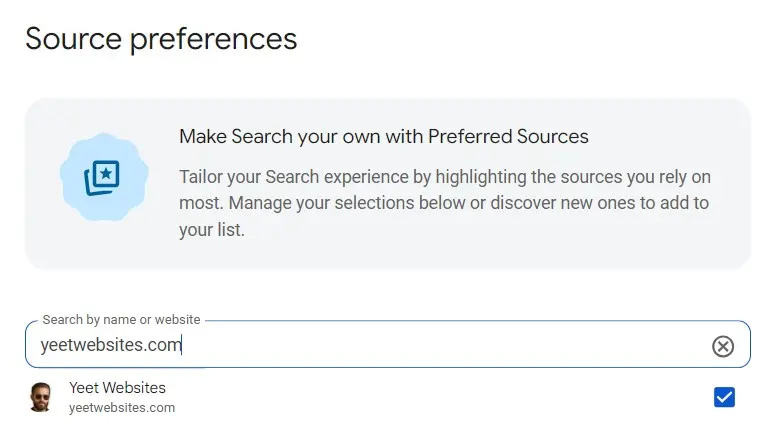
For example, yeetwebsites.com is one of the domains currently listed as eligible in the tool:
A link to the Preferred Sources tool now sits at the bottom of every post on this site, so it’s easy for a returning reader to mark it as preferred without hunting for the URL. Here’s the current version of that block, using Google’s official button instead of a plain text link:

How to Add the Official Button to a Website
Google publishes ready-made button assets for this, so a site owner doesn’t have to design one from scratch. The button comes in two color versions: a dark badge (black background, meant to sit on a light page background) and a light badge (white background, meant to sit on a dark page section).
Steps to Add the Button
1. Go to Google’s official documentation page for Preferred Sources and download the button asset package. It includes both color versions, in standard and high-resolution (@2x) sizes.
2. Pick the version that matches the background it will sit on. A dark badge on a white page background, a light badge on a dark section.
3. Upload the image file to the site’s media library, the same way any other image gets uploaded.
4. Wrap the image in a link pointing to the site’s own deeplink: https://google.com/preferences/source?q=yourdomain.com, replacing yourdomain.com with the actual domain.
5. Set the link to open in a new tab, so a reader doesn’t lose their place on the page they were reading.
No custom design is required. Google’s own documentation confirms a site can build its own button instead, as long as it links to the same deeplink format. The badge is just a visual option, not a requirement for the feature to work.
One limitation worth knowing: Google doesn’t provide any dashboard, report, or count showing how many people have added a site as a preferred source. There’s no way to measure this directly in Search Console or Analytics.
How Preferred Sources Got Here
Timeline
August 2025: Google launched Preferred Sources as a limited rollout in the US and India.
December 2025: Expanded worldwide in English, with roughly 90,000 sites selected by users at that point.
April 30, 2026: Rolled out globally to all supported languages.
May 27, 2026: Expanded into AI Overviews and AI Mode, meaning a preferred site can now be highlighted inside AI-generated answers, not just traditional search results.
The May 27 expansion is the one that changes the stakes. Before that, Preferred Sources only affected placement in Top Stories, a specific, limited part of the results page. Once it extended into AI Overviews and AI Mode, it started affecting the same AI-driven search results that have been pulling traffic away from websites generally, a shift covered in an earlier post on AI Overviews cutting real website traffic.
Source: Google Search Central